Mana plugins · Mana 0.3.0+ · macOS 14+
Show any AI balance or quota in your Mac menu bar.
Codex, Claude, Gemini, Antigravity, Cursor and Grok are built in. For everything else — another AI vendor's credits, your company's internal quota system, or any number you can measure — add a plugin and Mana shows it as a ring next to the rest.
Download Mana for MacYou don't have to write the plugin yourself. Your AI coding agent can do it.
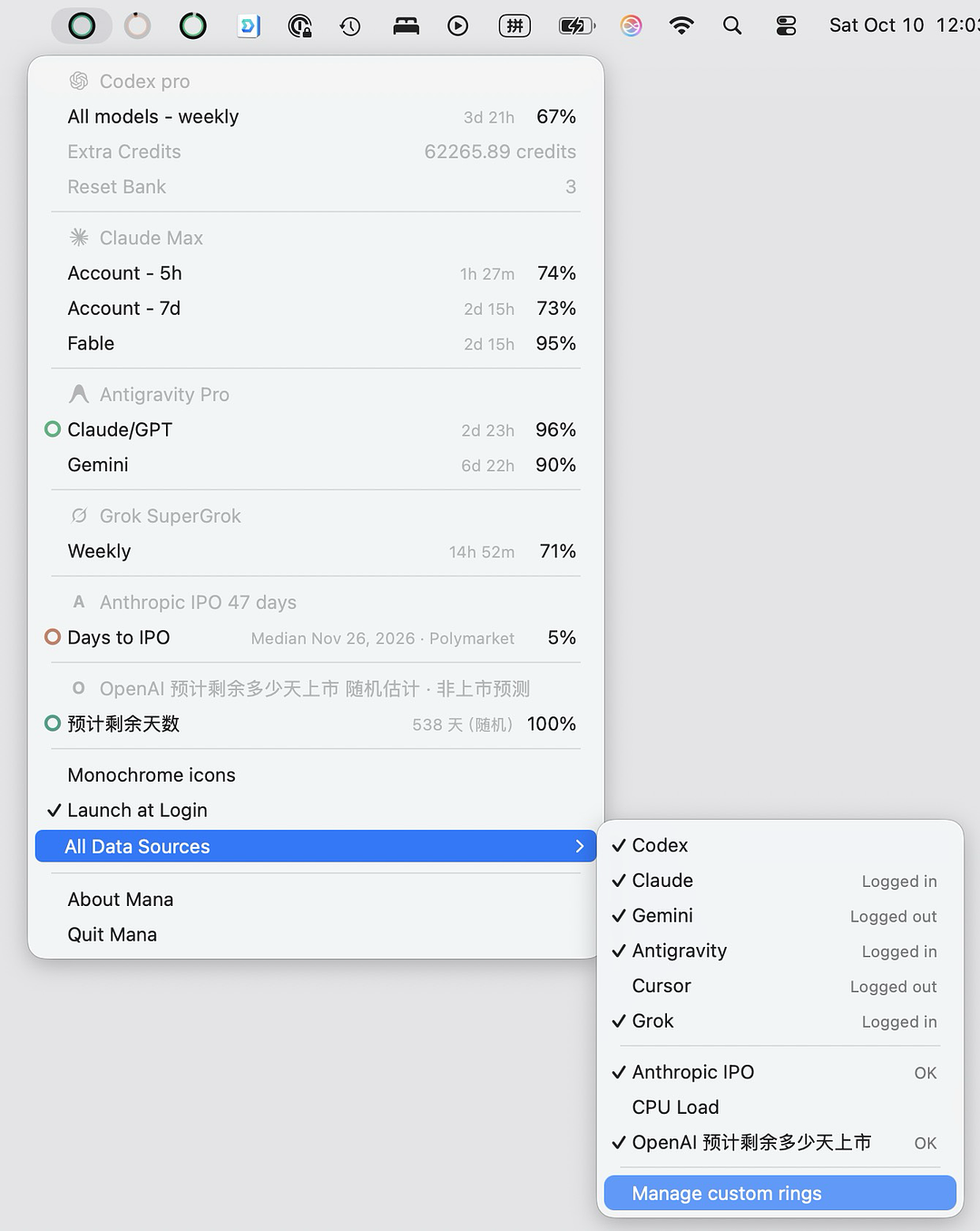
What can a plugin show?
- AI vendors that aren't built in. API balances and credits from services such as OpenRouter, DeepSeek or Kimi, or usage limits of coding tools such as GitHub Copilot, Windsurf and Kiro — whenever a script can read them from the service's API, its CLI or files on your Mac.
- Your company's internal quota system. A team token budget, an internal LLM gateway such as a LiteLLM proxy, a monthly spend cap: if an internal API or CLI reports how much is left, a plugin can turn it into a ring.
- Any other number. CPU load, an API balance, a stock price, a countdown. Rows without a percentage appear as text in the menu.
Each plugin can report up to 20 rows. Rows with a remaining percentage can become rings; reset times show as countdowns in the menu, just like the built-in vendors.
The easy way: let your AI agent write it
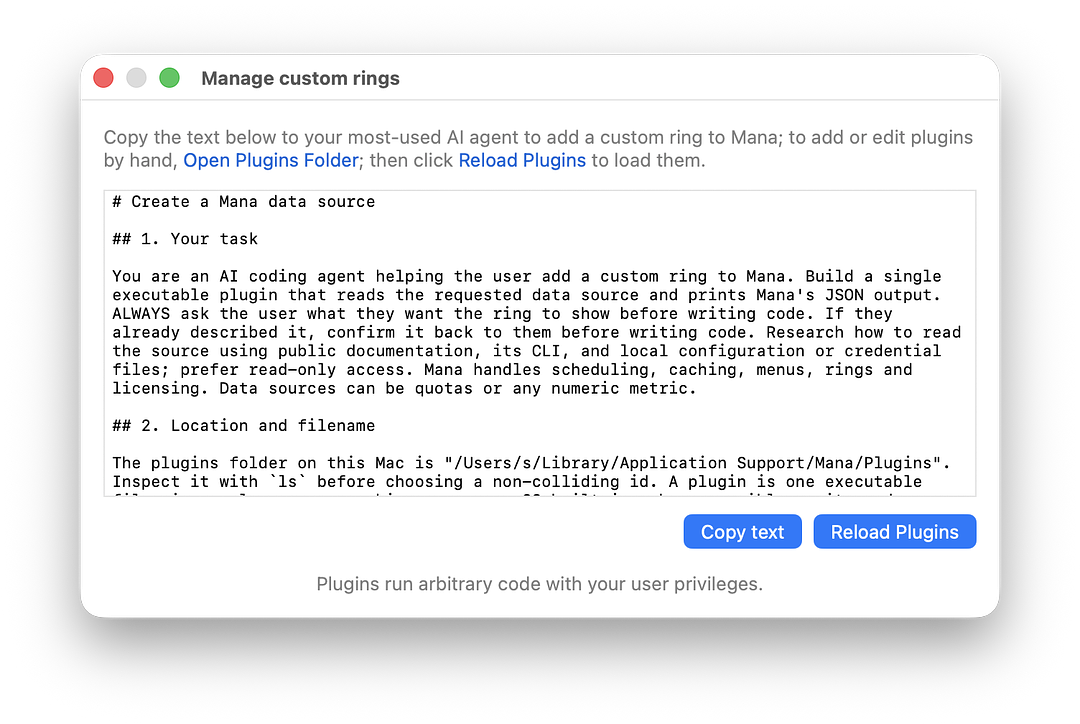
- In Mana, open All Data Sources → Manage custom rings.
- Copy the ready-made prompt into Claude Code, Codex or any coding agent, and say what you want the ring to show.
- The agent confirms what you want, works out how to read the data, writes the plugin and tests it with Mana's own runtime until it passes. It then installs it in your Plugins folder.
- Click Reload Plugins, check the new source in All Data Sources, and choose which of its rows to show as a ring.
How a plugin works
For anyone who wants to write or review one by hand:
- One executable file, any language. A shell, Python or Node script with a
#!line, or a compiled binary, made executable withchmod +xand placed in the Plugins folder. - The filename sets the schedule.
<id>.<interval>.<ext>, for exampleteam-budget.5m.shruns every five minutes. Intervals range from 10 seconds to 1 day. - It prints one JSON object. Mana runs the file with no arguments, waits up to 30 seconds, and reads its output. For quotas, report the remaining percentage.
- Optional header tags set the display name, color and logo.
#!/bin/bash
# <mana.name>Team Budget</mana.name>
# <mana.color>#4A90E2</mana.color>
# …read your quota here, then print:
echo '{"summary":"Engineering","rows":[
  {"id":"monthly","label":"Monthly budget","percent":64,
   "resetsAt":"2026-11-01T00:00:00Z"}]}'
Test a plugin exactly as Mana runs it, without enabling it:
/Applications/Mana.app/Contents/MacOS/Mana --plugin-test ~/path/to/team-budget.5m.shMana reports any filename or output problems and ends with RESULT: PASS when the plugin is ready. The ready-made prompt in Manage custom rings contains the full output format, including error statuses such as auth_expired.
Plugins and your security
A plugin is ordinary code that runs on your Mac with your user privileges. New plugins start switched off and only run once you check them in All Data Sources. Plugins are not reviewed, signed or sandboxed by Silent Spell, and their network traffic is outside Mana's network allowlist and Network Transparency report. Mana does not collect, store or pass credentials to plugins; a plugin reads its own, ideally from an existing CLI's credentials, read-only. Only enable plugins you trust.
Questions about Mana plugins
Do I need to know how to code to add a plugin?
No. In Mana, open All Data Sources → Manage custom rings and copy the ready-made prompt into Claude Code, Codex, or any coding agent. Say what you want the ring to show; the agent researches the data source, writes the plugin, tests it with Mana and installs it.
How can I see my OpenRouter credits in the Mac menu bar?
Add a plugin that reads your remaining credits from OpenRouter's API with your API key. Ask your coding agent to “show my OpenRouter credits” using the prompt from Manage custom rings; Mana then keeps the balance in the menu bar, as a ring when the plugin reports a remaining percentage.
How do I monitor my DeepSeek or Kimi API balance on a Mac?
Both services report your account balance through their APIs, so a plugin can read it and Mana can show it in the menu. A balance is an amount rather than a percentage: to show it as a ring, have the plugin compare it with a reference such as your last top-up and report the remaining percentage.
Is there a menu bar app for GitHub Copilot, Windsurf or Kiro usage?
These tools are not built into Mana, but a plugin can show their usage limits whenever they can be read from the tool's CLI, its API or files on your Mac. Your coding agent checks what is available before writing the plugin and reports if a source cannot be read reliably.
Can I track my team's LLM gateway budget, such as a LiteLLM proxy key?
Yes, if the gateway reports spend and budget to a script on your Mac. A plugin can read your key's spend and budget limit, report the remaining percentage, and Mana shows it as a ring next to your vendor quotas.
Can Mana show my company's internal quota or budget?
Yes, if a script on your Mac can read it — for example from an internal API, a CLI or a file — using credentials you already have. The plugin prints the remaining percentage and Mana shows it as a ring next to your other quotas.
Which AI vendors can a plugin support?
Any vendor whose balance, credits or usage limits a script can read from its API, its CLI or files on your Mac — for example OpenRouter, DeepSeek or Kimi API balances, or coding tools such as GitHub Copilot, Windsurf and Kiro. Codex, Claude, Gemini, Antigravity, Cursor and Grok are built in and need no plugin.
Are plugins safe?
A plugin is ordinary code that runs on your Mac with your user privileges, so only enable plugins you trust. Plugins start switched off, are not reviewed, signed or sandboxed by Silent Spell, and their network traffic is outside Mana's allowlist and Network Transparency report.
Does a plugin ring count toward the free ring?
Yes. The free version shows one ring in total, built in or plugin. Multi Rings unlocks every ring.
More quota viewing guides
Mana is independent software by Silent Spell, not affiliated with the AI providers. See how Mana accesses quota data.